

Microsoft Excel is packed with useful tools, but most people only use a small part of what it can actually do. If you mostly rely on basic formulas and simple tables, you could be missing features that make your work much faster and easier. The good news is that some of the best Excel tricks are simple to learn and can save you a lot of time once you start using them regularly.
Whether you use Excel for work, school, budgeting, or organizing data, these Excel hacks can help you work smarter. Here are five Microsoft Excel hacks that can seriously improve the way you use spreadsheets.
1. Flash Fill can do repetitive work for you
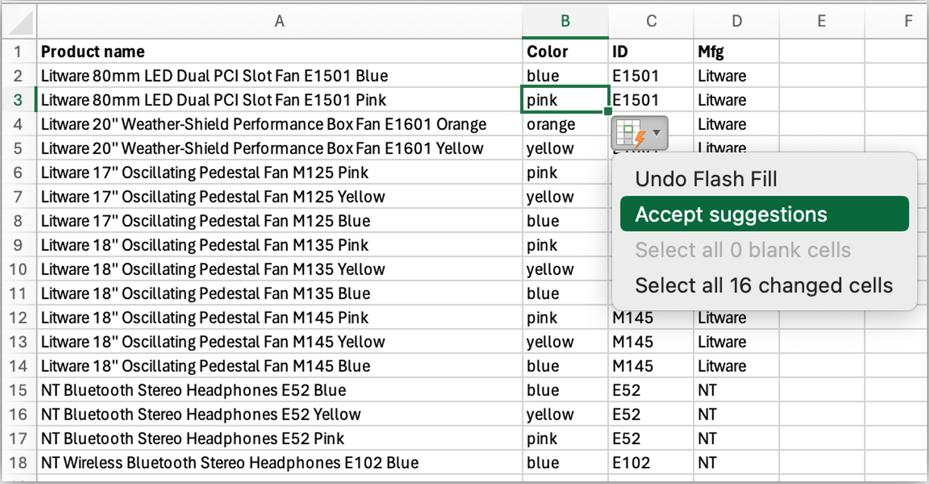
One of the most underrated Excel features is Flash Fill. It recognizes patterns in your data and automatically fills in the rest for you. This is especially useful when you need to split full names, combine text, format phone numbers, or clean messy data.
For example, if one column contains full names and you want to separate first names into another column, you can type the first result manually. Excel often detects the pattern and fills the remaining cells automatically. Instead of writing formulas for every step, Flash Fill can do the heavy lifting in seconds.
This is one of the fastest ways to clean spreadsheet data without using complicated functions.
2. Freeze Panes keeps headers visible
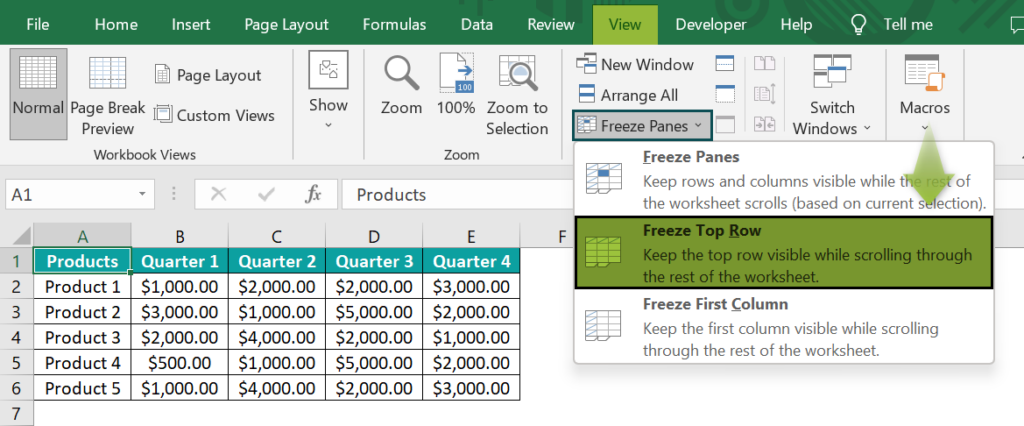
Large spreadsheets can become frustrating when you scroll down and lose sight of your column headings. That is where Freeze Panes becomes incredibly useful.
With Freeze Panes, you can lock the top row or the first column so important labels stay visible while you move through the sheet. This makes it much easier to read large tables, compare rows, and avoid entering data in the wrong place.
It is a simple feature, but once you start using it, it quickly becomes one of the most helpful Excel productivity tricks for everyday work.
3. Conditional Formatting makes data easier to understand
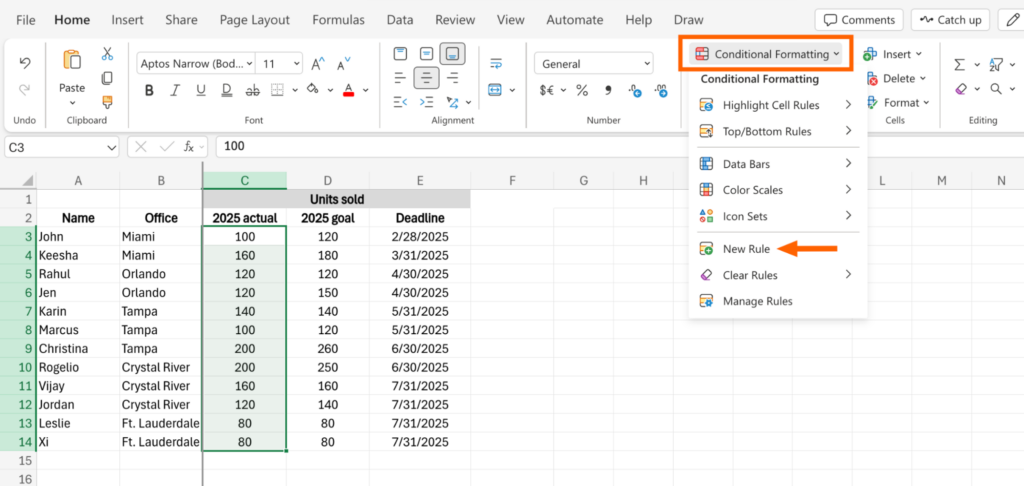
If you want important numbers to stand out instantly, Conditional Formatting is one of the best tools in Excel. It lets you automatically highlight cells based on rules you set, such as values above a target, duplicate entries, overdue dates, or low stock levels.
Instead of scanning rows manually, you can let Excel visually point out the information that matters most. This is especially useful for budgets, reports, sales sheets, and performance tracking.
Conditional Formatting not only saves time, but also makes your spreadsheets easier to read and much more professional.
4. PivotTables can summarize data in seconds
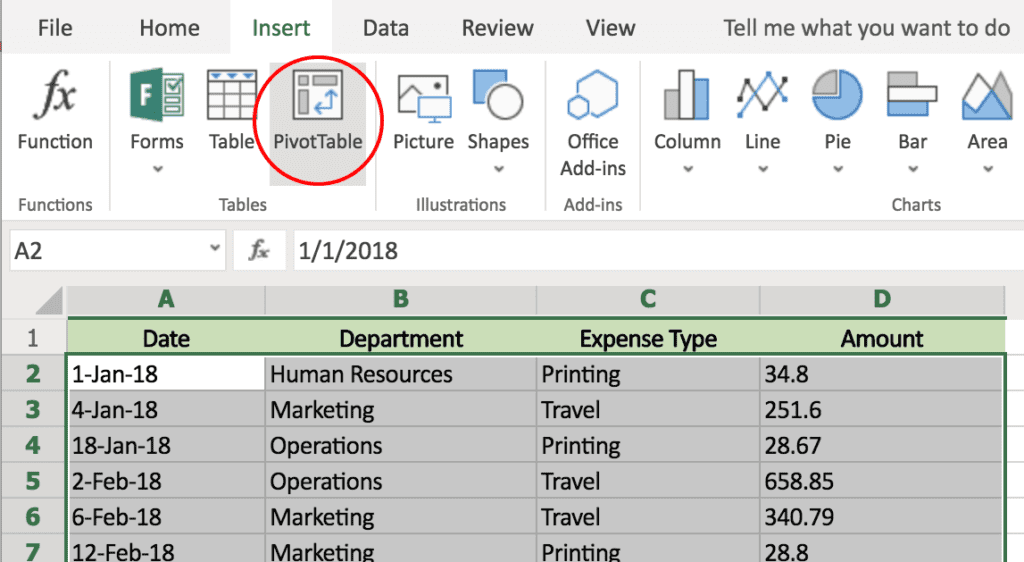
PivotTables might sound advanced, but they are one of the most powerful Excel features for organizing and analyzing information quickly. If you have a long list of sales, expenses, orders, or survey responses, a PivotTable can turn that raw data into a clean summary within seconds.
You can use PivotTables to group numbers by category, count items, calculate totals, or compare results without manually building complex formulas. For anyone working with large spreadsheets, this is one of the best Excel hacks to learn.
Once you understand the basics, PivotTables can save hours of manual sorting and reporting.
5. Keyboard shortcuts can speed up everything
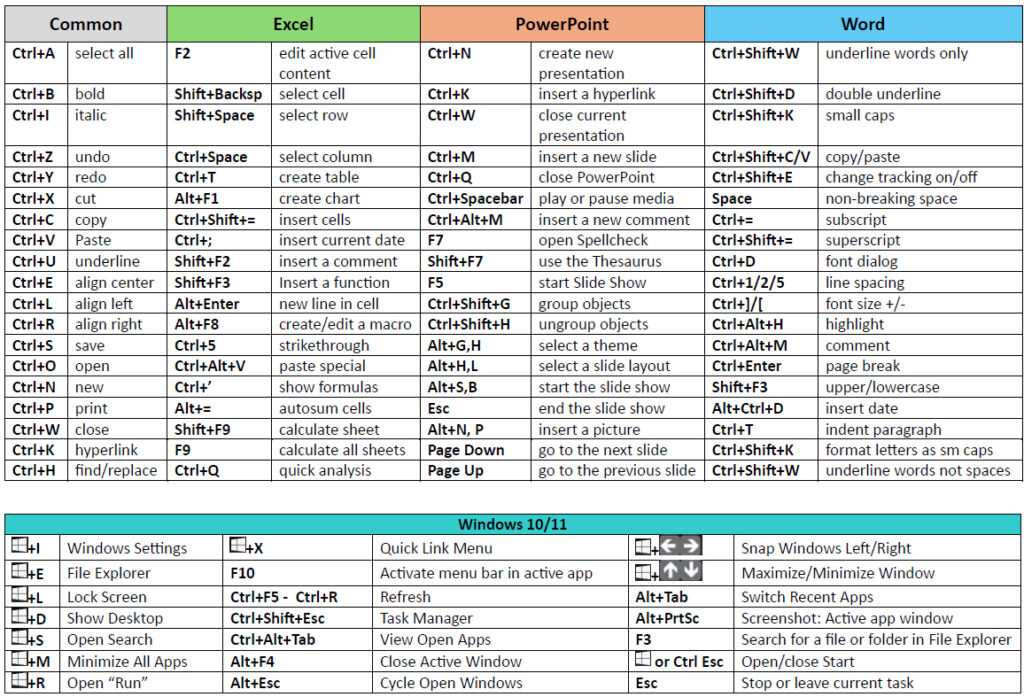
A lot of Excel users waste time clicking through menus for tasks they could do instantly with keyboard shortcuts. Learning just a few common shortcuts can make a huge difference in how fast you work.
Some of the most useful ones include:
- Ctrl + Arrow keys to jump through data quickly
- Ctrl + Shift + L to turn filters on or off
- Ctrl + T to create a table
- F4 to repeat your last action
- Alt + = to quickly insert AutoSum
These shortcuts may seem small on their own, but together they can make Excel feel much faster and smoother to use.
Why these Excel hacks matter
The best Microsoft Excel hacks are not always the most complicated ones. Often, the features that save the most time are the simple tools hiding in plain sight. Flash Fill, Freeze Panes, Conditional Formatting, PivotTables, and keyboard shortcuts can all help you work more efficiently and reduce mistakes.
If you use Excel regularly, learning these tricks can make a big difference in your workflow. Instead of spending extra time on repetitive tasks, you can let Excel do more of the work for you. That means faster spreadsheets, cleaner data, and less frustration every time you open a workbook.
For beginners and experienced users alike, these are the kind of Excel hacks you will wish you had started using sooner.







